
How to Find Competitor Ads on Pinterest
The official library is real and free. It is also empty for most brands, and the reason why points at a better method.

Henry SedgwickProduct marketing
To find competitor ads on Pinterest, start at the Pinterest ads repository: ads.pinterest.com/ads-repository/. It is free, it needs no Pinterest account, and you can filter by advertiser, country, category, age, gender and date. I opened it while writing this with no login at all and it worked fine.
Then comes the catch nobody writing about this seems to mention. The country dropdown holds exactly 30 entries. The United States is not one of them. Neither is the United Kingdom, Canada or Australia. So if the competitor you care about sells to Americans, the official library will show you nothing, and you need the second route in this article rather than the first.
30
Countries in the repository: all 27 EU states plus Brazil, Norway and Türkiye
0
Of the US, UK, Canada and Australia are covered
Free
No account, no business profile, no login of any kind
01
The official way to find competitor ads on Pinterest
It exists because of the EU Digital Services Act, which is why the coverage looks the way it does. Pinterest's own DSA disclosure puts it at 87,497,257 average monthly active users in the EU for the first half of 2026, comfortably over the line that forces a platform to publish an ad repository at all. Pinterest calls it the ads repository rather than an ad library, and it opens on a filter row with a date window already set to the last few days. That default is worth changing immediately, because a five day window on a single country is how most people conclude the tool is broken.
The filter row, and who is actually in it
What one ad record actually contains
Every result carries a Details link that opens its own permanent page. Below is a real one, a clothing seller called petecoshop, exactly as the fields appeared. It is a longer list than you would expect, and most of it is empty.
One ad record, field for field
02
What to do when the search comes back empty
This is the moment most readers actually hit, and no guide I found covers it. I searched a household beauty name in France and got "No results match your search criteria" straight back. The advertiser was in the dropdown. It still returned nothing. Work through this before deciding they are not advertising.
- 1
Widen the date window first
It loads with a window of about five days. Drag the start date back months. Ended campaigns stay listed, so the record I pulled had already stopped running a week before I read it.
- 2
Change the country, then change it again
The results are per country, not pooled. A brand can be heavy in Germany and absent in France. There is no all countries option, so this is a manual loop.
- 3
Try every version of their name
The advertiser box is a picker, not a free text search. Typing one beauty retailer gave me five separate legal entities, including a Brazilian arm and a Slovenian one. They do not share results.
- 4
Accept it when they are genuinely not there
A US only brand will never appear, however you filter. That is not a bug in your search, it is the scope of the law that created the tool.
- 5
Switch to their profile instead
Which turns out to be the better move anyway, for a reason specific to how Pinterest works.
03
On Pinterest, the ad and the pin are the same object
Here is Pinterest describing its own ads: "Ads are Pins that businesses pay to promote. They appear in your home feed and search results." Read that literally, because it is literal. A Pinterest ad is not a separate artefact built in an ads manager. It is a pin, sitting on a board, that somebody put money behind. The only difference between it and the pin next to it is a small Promoted label.
That changes what competitor research means here. On Meta, the ad library is the only way to see creative that never appears on the brand page. On Pinterest, a competitor's public profile is already the full set of things they might promote, visible to anyone, with no library involved.
Three ways in, and what each one is good for
The repository
Their profile
Your own feed
“I spent two weeks trying to get the ad library to show me anything for our US competitors. Then I opened one of their Pinterest boards and there were four hundred vertical statics sitting there for free. I felt slightly stupid.” Ellie, homeware, six figures a year
04
A real pin, pulled apart
This is why Pinterest is worth the trouble even when the library fails you. Below is a pin I pulled out of the AIMS library, a lip gloss ad from TODOMODA. Look at it as a piece of production rather than as a pin, because that is what it is: a finished vertical static ad, built by somebody who knew what they were doing.
Five decisions in one pin
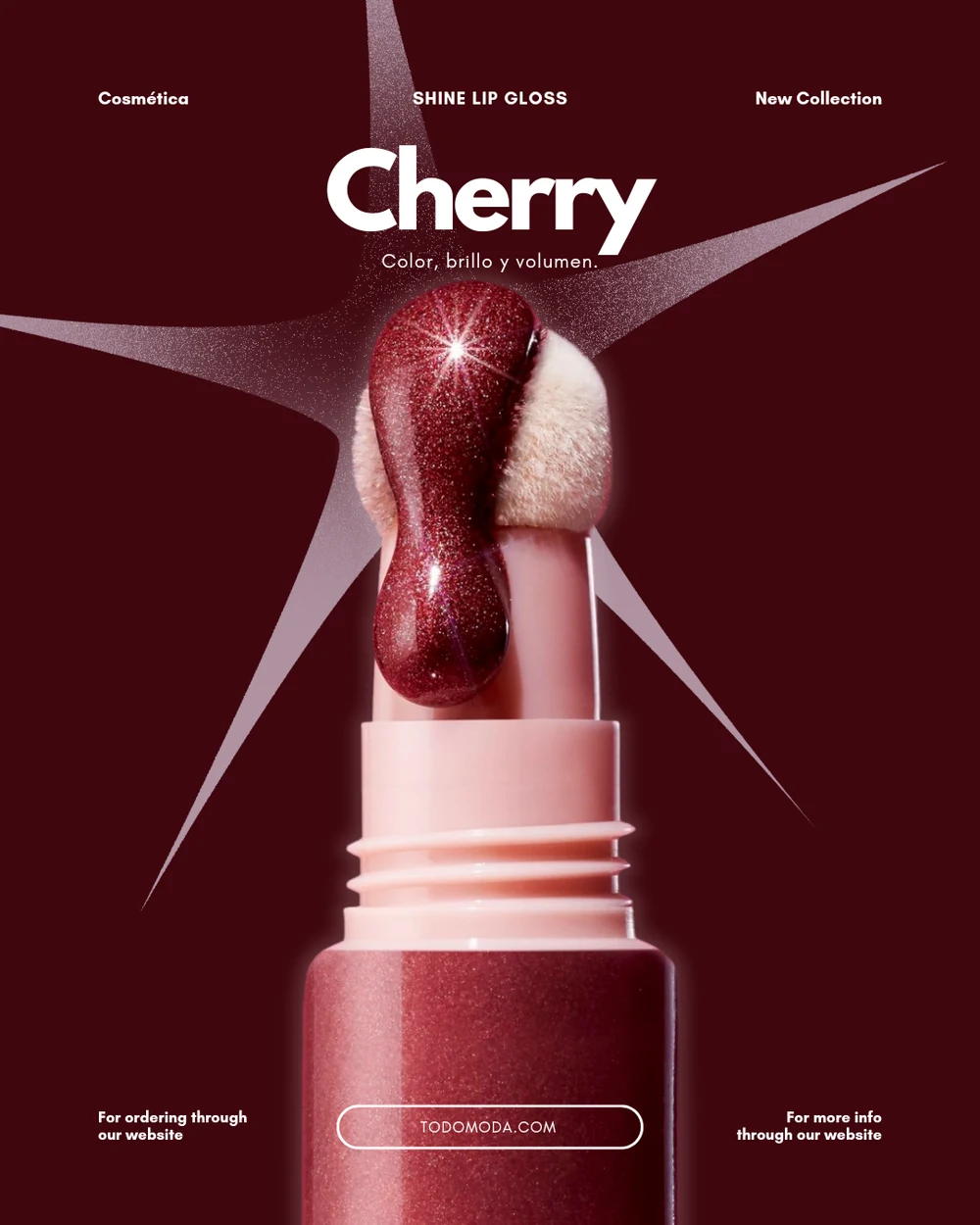
A pin is already the thing you were trying to make. Vertical, product first, one idea, built to survive a fast scroll.
05
Turning a pin into an ad for your own product
This is the step everything above was for, and it is where most competitor research quietly dies. People save four hundred pins and never open the folder again. The reason is that a saved pin is inspiration, and inspiration does not tell you what to do on Monday.
Image models have got very good at making things. They will hold your bottle steady across fifty frames without the label drifting. What they have never had is judgement. Ask for "a lip gloss ad" and you get the average of every ad the model has seen, which is a centred tube on a gradient, because an average is the safest answer to a vague question.
What the model is good at
Rendering, repetition and patience. Twenty variants of the same idea, at three in the morning, without getting bored or precious about it.
What it is bad at
Deciding. It has no opinion on whether the shade name should be the headline, or whether a starburst behind the product is solving a real contrast problem.
What a finished pin does
It removes the deciding. Every one of those five calls was made by a person already. The judgement arrives attached to the file.
06
Where AIMS fits
AIMS is a free searchable library of real ads, emails, videos and pins, and Pinterest sits in it next to Meta, Instagram, TikTok, Amazon and Etsy, which is where the TODOMODA pin above came from. The free Chrome extension saves anything you find while browsing straight into it. The Discover page is the browsing half. The part that matters is what happens next: when you save something, AIMS does the teardown step itself, reads what the designer actually did, and hands that analysis to the model along with your product photography and your palette. The teardown page walks through the loop. What comes back is your product, in that structure, with none of their assets in it.
“We sell candles and I had been copying other candle ads, which is why everything looked the same. Now I mostly pull from skincare pins. Same shape of problem, better design, and nobody in my category has seen it.” Marcus, home fragrance, team of three
07
FAQs
Does Pinterest have an ad library?
Yes. It is called the ads repository, it lives at ads.pinterest.com/ads-repository/, and it is free with no login. It exists to satisfy the EU Digital Services Act, which is why it covers 30 countries rather than everywhere. There is also an API, linked from the bottom of the page, if you would rather pull records than click through them.
Can I see competitor Pinterest ads in the US or UK?
Not through the official repository. Neither country is in the dropdown. For US and UK brands you are looking at their public profile and boards instead, plus whatever appears in your own feed with a Promoted label, plus third party libraries that index pins.
How do I tell if a pin is an ad?
Look for the Promoted label. Pinterest describes ads as pins businesses pay to promote, so a promoted pin and an organic one are the same kind of object and look identical apart from that label. Which also means an ad can be saved to a board like anything else.
Can I see how much a competitor spent on Pinterest ads?
No. There is no spend figure anywhere in the repository, and reach is given as a bucket rather than a number, so a small advertiser and a mid sized one both read as 0 to 10,000. The closest thing to a performance signal is the date range: an ad that ran for a month was being fed budget for a reason.
What size should the pin be when I build my own version?
Pinterest recommends a 2:3 ratio, or 1000 by 1500 pixels, and warns that pins taller than 2:3 might get cut off. That single constraint is most of why competitor pins make good references: everyone is solving the same vertical frame, so a layout that works in one category tends to survive being moved to another.
Do AI generated pins get labelled?
Pinterest applies a gen AI label when its systems detect generation or modification, either from the image metadata or from its own classifiers. On an ordinary pin it shows at the bottom left when you click through. On an ad it appears with the other ad details behind the ellipsis. Worth knowing before you ship a set of generated pins.